About Vario One
VARIO One - Your smart variometer for iPhone and Apple Watch. As precise as a pro vario. As simple as an app. No extra hardware. VARIO One combines a pressure sensor, an accelerometer and GPS into a full-featured...
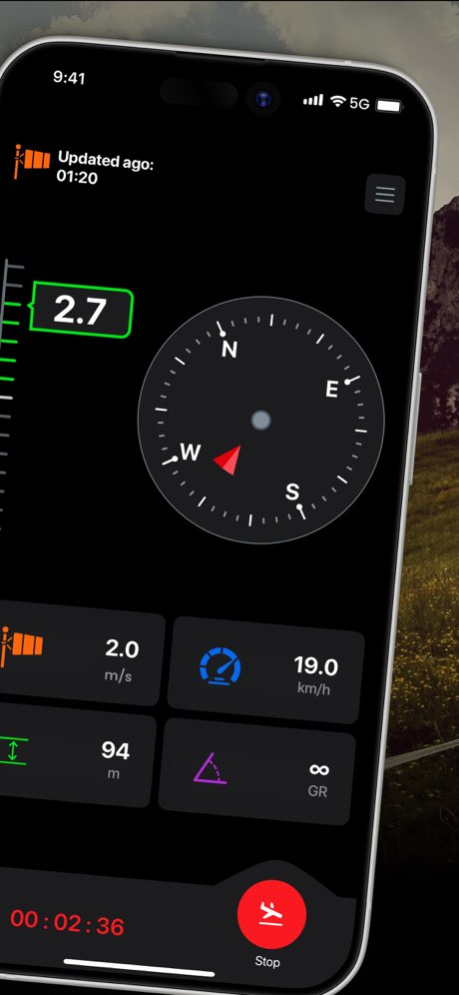
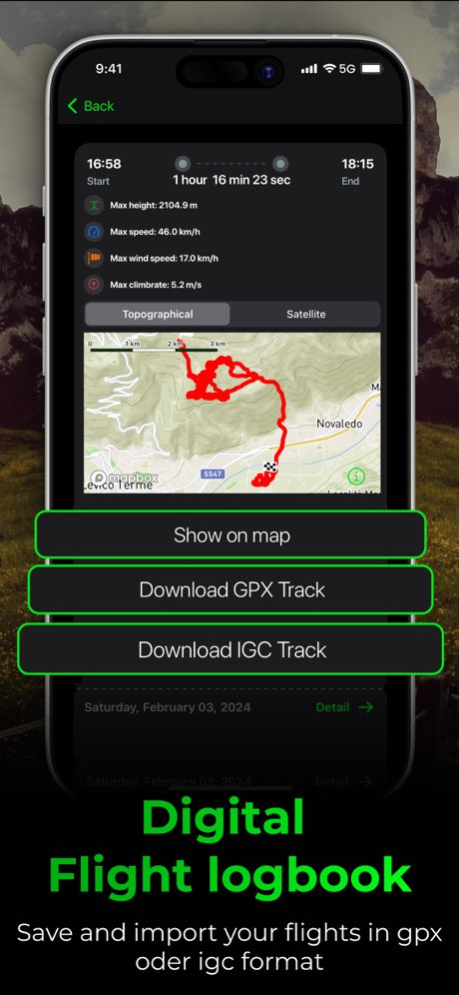
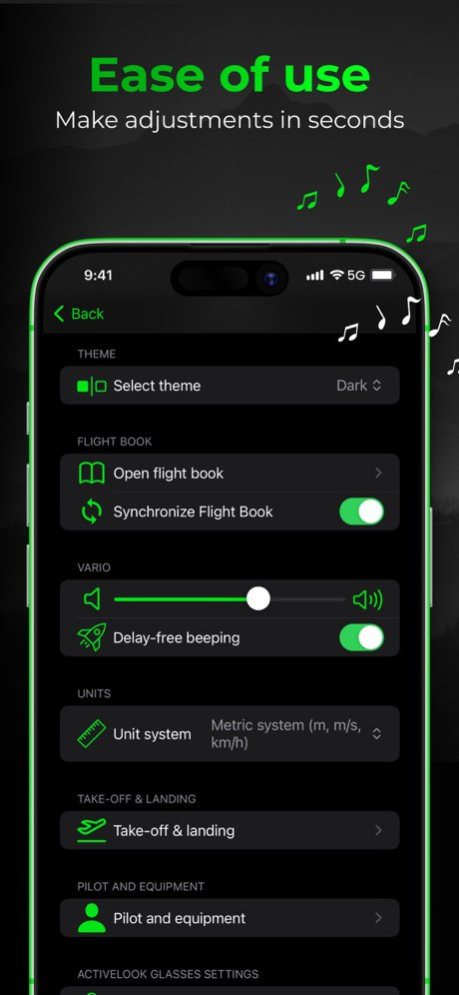
VARIO One - Your smart variometer for iPhone and Apple Watch. As precise as a pro vario. As simple as an app. No extra hardware. VARIO One combines a pressure sensor, an accelerometer and GPS into a full-featured variometer - right on your iPhone and Apple Watch. Both apps work independently and signal lift with acoustic beeps. Optionally connect an external Bluetooth vario for even more precision. Try all features free for 14 days. VARIOMETER - Instantly audible lift by combining pressure and acceleration sensors. - Internal barometer (baro + IMU fusion) - a calmer, more precise signal. - Display of altitude, speed and glide ratio. - Barometric altitude with QNH - set directly on the flight screen. - Climb tone threshold freely configurable (down to -0.5 m/s). - Rotating wind direction indicator. FLIGHT RECORDING - Automatic recording as GPS and IGC track. - Digital logbook with map view and statistics. - Automatic upload to DHV-XC and XContest. - Automatic take-off and landing detection. MAP - Airspaces downloadable per country or importable as OpenAir files. - Current wind from thousands of weather stations. - Take-off and landing sites - permanently free to view. AIRSPACE MAP & ALERTS Download airspace maps for any country right in the app from OpenAIP. Or import your own OpenAir files (classic as well as Naviter 1.0/2.0). All airspaces are shown as a vector map; tap for details, altitude profile and legend. As you approach, VARIO One warns you with a voice announcement and a configurable lead time - including a snooze function and automatic escalation. REAL-TIME AIR TRAFFIC WITH SAFESKY See nearby aircraft - paragliders, hang gliders, sailplanes, helicopters - using SafeSky, including other SafeSky users on the map. ADS-B, FLARM, OGN, PilotAware, and other supported traffic sources - all in one real-time view. Coverage depends on the availability of compatible transmitters and network reception. BUDDY FLYING - FLY TOGETHER, EVERYONE IN VIEW With Buddy Flying you see your flying partners live on the map - perfect for a shared cross-country flight or a day at your local mountain. One person creates a group and shares the code, the others join. As soon as "Sharing" is active, you all see each other in real time. For each buddy you see position with distance and bearing, absolute altitude and altitude relative to you, current climb and an 8-second average, plus speed. When a buddy is climbing, you see it in their climb rate - and know where the thermal is. A colour scale shows how their climb compares to yours. EXTERNAL BLUETOOTH VARIOS Connect your device wirelessly to use it as your vario signal source: BlueFly Vario (multiple protocols), Mipfly MipBipX & MipTrack, Stodeus BlueBip & UltraBip, Skytraxx (BLE). Connect any time from the settings - no onboarding needed. THERMAL ASSISTANT Your flight track is coloured live by climb and sink values - so you instantly see where the best thermal is in the turn. The app automatically detects circling and switches to the thermal view. Including wind direction and speed. IMPORT FLIGHTS Import previously flown flights as GPX or IGC files straight into the logbook - via the + button or via "Open with" from the Files app. APPLE WATCH - Standalone vario with precise pressure sensors. - Ideal for hike & fly, as a backup or when there's no room in the cockpit. - Flight recording in GPX and IGC format. New features are added regularly. Try everything free for 14 days. Take-off and landing sites remain free afterwards too. The subscription renews automatically and can be cancelled any time.
Version History Your own climb tone Two sounds to choose from – and in the Sound Studio at vario-one.com you can design your own and bring it into the app. Your vario's battery level Vario One shows you how much charge your XC Tracer has left: on the flight screen and in the device settings. 7.3 2d ago More precise vario The vario now matches the accuracy of dedicated flight instruments – with no extra hardware. Barometer lag is compensated and periods of rest are reliably detected. Climb readings stay steady, even after quick movements. XC Tracer supported Your XC Tracer can now be paired directly – like BlueFly, Mipfly, Stodeus and Skytraxx. Climb tone: device or app You decide what sounds. With a vario connected, the app leaves the tone to it and takes over again by itself when needed. Plus a climb tone that starts exactly at your chosen threshold, and a climb scale that follows precisely. 7.2 Sep 29 • DHV practice record (Germany): Vario One counts your flights from the last 24 months, fills in missing details from your logbook and creates the proof as a PDF. • DHV sites marked: German take-off and landing sites show the DHV logo, the source of the data and a link to the DHV site database. • Clearer buddy markers: a compact ring with climb rate and direction; buddies in the same thermal are merged into a single marker. 7.1 Sep 5 New: Buddy Flying – fly together and see your flying partners live on the map. - Create a group, share the code, join – as soon as "Sharing" is active, you all see each other in real time. - For each buddy: position with distance and bearing, altitude absolute and relative to you, climb current and as an 8-second average, plus speed. - A colour scale instantly shows who just found the best thermal. Also: minor improvements and bug fixes. 7.0 Jul 31 Translations have been added for all languages 6.6 Jul 3 All-new airspace system, four new external variometers, barometric altitude/QNH, and more. AIRSPACE SYSTEM (ALL NEW) • Download airspace maps country by country – directly from OpenAIP, always up to date • Import your own OpenAir files (classic and Naviter 1.0/2.0) • All airspace displayed as a vector layer – tap any zone for details, vertical profile, and legend • Real-time warnings as you approach airspace – with voice alerts (TTS), configurable lead time, snooze, and escalation • Warning system can be toggled on/off BAROMETRIC ALTITUDE & QNH (NEW) • Set QNH directly from the flight screen • Barometric altitude display based on current pressure EXTERNAL BLE VARIOMETERS (NEW) • Skytraxx (BLE) now supported • Mipfly MipBipX and MipTrack added • Stodeus BlueBip and UltraBip added • BlueFly: improved multi-protocol support • New vario hub with device status, vendor badges, and shop links VARIOMETER IMPROVEMENTS • Kalman filter for internal barometer (baro + IMU fusion) – smoother signal • Climb tone threshold now configurable down to −0.5 m/s ORIENTATION LOCK • Lock screen rotation in the flight view with a single tap BLUETOOTH • Pair devices from Settings at any time – no longer tied to onboarding • Critical connection and background execution bugs fixed OTHER FIXES • Fixed layout infinite loop on device wake (watchdog crash) • Improved flight screen layout on small devices (iPhone SE) • Light mode is now the default after a fresh install • Flight timer no longer wraps under Display Zoom 6.5 Jun 29 Vario now reacts even faster: A new filter architecture that combines the device's barometer and motion sensors lets you hear climbs the instant they start — without becoming jittery. 6.4 May 12 New: Pilot & Equipment now includes a Save button and clearer server sync. We also fixed a display issue when using large text sizes. 6.3 Apr 21 Mute vario before flight: The vario tone can now be configured to activate only after the flight timer starts. Perfect for keeping things quiet while preparing your lines before takeoff. 6.2 Apr 15 - SafeSky data volume statistics: Keep track of your SafeSky data usage — upload and download broken down by Today, Yesterday, 7 Days, 30 Days and All Time. - Ground tracking: After SafeSky registration you can choose whether to see air traffic on the map while on the ground. 6.1 Mar 19 New in Version 6.0: • SafeSky Integration – See other air traffic in real time on your map: paragliders, hang gliders, sailplanes, helicopters and more. Your position is shared so others can see you too. Free registration right in the app. • Traffic Radar Alarm – Get instant sound and vibration alerts when other air traffic approaches. The warning level automatically adapts to distance and closing speed. • Thermal Assistant (Experimental) – Your flight track is color-coded by climb and sink rates on the map. Automatically detects circling and switches to the thermal view. Includes wind direction and speed. • GPX & IGC Import – Import your previously flown flights as GPX or IGC files directly into the flight book. Use the + button in the flight book or "Open with" from the Files app. 6.0 Mar 12 - Fewer permissions on first launch – the app now only requests what is truly needed. - Apple Watch settings have been simplified for a cleaner overview. 5.0 Feb 1 • New 14-day free trial for all features. • Launch and landing sites now permanently free to view. 4.9 11/19/2025 From now on, you can see directly in the app which permissions are required on iPhone and Apple Watch – and what they are for. This way, you’ll always know which accesses are needed to fully enjoy all functions like altitude calculation, vario usage, and Bluetooth device connectivity. 4.7 08/14/2025 Minor adjustments for the latest iOS version 4.5 05/15/2025 For our motorized flying friends, we have implemented a new unit system for the display on Apple Watch and iPhone: Vertical Speed = ft/min (feet per minute) Speeds = Kts (knots) Altitude = ft (feet) 4.4 01/21/2025 As of now, the BlueFly Vario is supported. This allows you to use Vario One on an older iPhone in combination with one of the best hardware variometers. 4.3 11/05/2024 NEW FEATURE: From now on, you can upload your flights directly from the flight log to XContest. Of course, they will be displayed as verified IGC files on XContest. 4.2 09/19/2024 The heat map of the map function has been optimized 4.1 07/09/2024 The biggest update of all time. From now on, you can switch to a map view and still have all the important instruments in view. You can see the current wind direction from thousands of wind stations worldwide. Additionally, you can view airspaces and see where others have already found thermals using a heatmap. 4.0 07/03/2024 We made an optimization with the synching the time and prepared the upcoming map feature 3.4 06/02/2024 The upload to DHV-XC has been optimized and the future map function has been prepared :-) 3.3 04/14/2024 The algorithm between the barometer and the acceleration sensor has been optimized. 3.2 03/28/2024 You can now upload your flight directly from the flight logbook to DHV-XC 3.1 03/25/2024 1. a completely revised design 2. combination of air pressure sensor and acceleration sensor for even more precise climbing 3. automatic start and charge detection 3.0 02/20/2024
Previous Versions
Here you can find the changelog of Vario One since it was posted on our website on 2023-10-09 12:48:03.
The latest version is 7.3 and it was updated on 2026-10-06 19:47:30. See below the changes in each version.
Vario One version 7.3
Updated At: 2026-10-06
Changes: Version History Your own climb tone
Two sounds to choose from – and in the Sound Studio at vario-one.com you can design your own and bring it into the app.
Your vario's battery level
Vario One shows you how much charge your XC Tracer has left: on the flight screen and in the device settings. 7.3 2d ago More precise vario
The vario now matches the accuracy of dedicated flight instruments – with no
extra hardware. Barometer lag is compensated and periods of rest are reliably
detected. Climb readings stay steady, even after quick movements.
XC Tracer supported
Your XC Tracer can now be paired directly – like BlueFly, Mipfly, Stodeus
and Skytraxx.
Climb tone: device or app
You decide what sounds. With a vario connected, the app leaves the tone to it
and takes over again by itself when needed.
Plus a climb tone that starts exactly at your chosen threshold, and a climb
scale that follows precisely. 7.2 Sep 29 • DHV practice record (Germany): Vario One counts your flights from the last 24 months, fills in missing details from your logbook and creates the proof as a PDF.
• DHV sites marked: German take-off and landing sites show the DHV logo, the source of the data and a link to the DHV site database.
• Clearer buddy markers: a compact ring with climb rate and direction; buddies in the same thermal are merged into a single marker. 7.1 Sep 5 New: Buddy Flying – fly together and see your flying partners live on the map.
- Create a group, share the code, join – as soon as "Sharing" is active, you all see each other in real time.
- For each buddy: position with distance and bearing, altitude absolute and relative to you, climb current and as an 8-second average, plus speed.
- A colour scale instantly shows who just found the best thermal.
Also: minor improvements and bug fixes. 7.0 Jul 31 Translations have been added for all languages 6.6 Jul 3 All-new airspace system, four new external variometers, barometric altitude/QNH, and
more.
AIRSPACE SYSTEM (ALL NEW)
• Download airspace maps country by country – directly from OpenAIP, always up to date
• Import your own OpenAir files (classic and Naviter 1.0/2.0)
• All airspace displayed as a vector layer – tap any zone for details, vertical
profile, and legend
• Real-time warnings as you approach airspace – with voice alerts (TTS), configurable
lead time, snooze, and escalation
• Warning system can be toggled on/off
BAROMETRIC ALTITUDE & QNH (NEW)
• Set QNH directly from the flight screen
• Barometric altitude display based on current pressure
EXTERNAL BLE VARIOMETERS (NEW)
• Skytraxx (BLE) now supported
• Mipfly MipBipX and MipTrack added
• Stodeus BlueBip and UltraBip added
• BlueFly: improved multi-protocol support
• New vario hub with device status, vendor badges, and shop links
VARIOMETER IMPROVEMENTS
• Kalman filter for internal barometer (baro + IMU fusion) – smoother signal
• Climb tone threshold now configurable down to −0.5 m/s
ORIENTATION LOCK
• Lock screen rotation in the flight view with a single tap
BLUETOOTH
• Pair devices from Settings at any time – no longer tied to onboarding
• Critical connection and background execution bugs fixed
OTHER FIXES
• Fixed layout infinite loop on device wake (watchdog crash)
• Improved flight screen layout on small devices (iPhone SE)
• Light mode is now the default after a fresh install
• Flight timer no longer wraps under Display Zoom 6.5 Jun 29 Vario now reacts even faster: A new filter architecture that combines the device's barometer and motion sensors lets you hear climbs the instant they start — without becoming jittery. 6.4 May 12 New: Pilot & Equipment now includes a Save button and clearer server sync. We also fixed a display issue when using large text sizes. 6.3 Apr 21 Mute vario before flight: The vario tone can now be configured to activate only after the flight timer starts. Perfect for keeping things quiet while preparing your lines before takeoff. 6.2 Apr 15 - SafeSky data volume statistics: Keep track of your SafeSky data usage — upload and download broken down by Today, Yesterday, 7 Days, 30 Days and All
Time.
- Ground tracking: After SafeSky registration you can choose whether to see air traffic on the map while on the ground. 6.1 Mar 19 New in Version 6.0:
• SafeSky Integration – See other air traffic in real time on your map: paragliders, hang gliders,
sailplanes, helicopters and more. Your position is shared so others can see you too. Free registration
right in the app.
• Traffic Radar Alarm – Get instant sound and vibration alerts when other air traffic approaches. The
warning level automatically adapts to distance and closing speed.
• Thermal Assistant (Experimental) – Your flight track is color-coded by climb and sink rates on the map.
Automatically detects circling and switches to the thermal view. Includes wind direction and speed.
• GPX & IGC Import – Import your previously flown flights as GPX or IGC files directly into the flight
book. Use the + button in the flight book or "Open with" from the Files app. 6.0 Mar 12 - Fewer permissions on first launch – the app now only requests what is truly needed.
- Apple Watch settings have been simplified for a cleaner overview. 5.0 Feb 1 • New 14-day free trial for all features.
• Launch and landing sites now permanently free to view. 4.9 11/19/2025 From now on, you can see directly in the app which permissions are required on iPhone and Apple Watch – and what they are for. This way, you’ll always know which accesses are needed to fully enjoy all functions like altitude calculation, vario usage, and Bluetooth device connectivity. 4.7 08/14/2025 Minor adjustments for the latest iOS version 4.5 05/15/2025 For our motorized flying friends, we have implemented a new unit system for the display on Apple Watch and iPhone:
Vertical Speed = ft/min (feet per minute)
Speeds = Kts (knots)
Altitude = ft (feet) 4.4 01/21/2025 As of now, the BlueFly Vario is supported. This allows you to use Vario One on an older iPhone in combination with one of the best hardware variometers. 4.3 11/05/2024 NEW FEATURE: From now on, you can upload your flights directly from the flight log to XContest. Of course, they will be displayed as verified IGC files on XContest. 4.2 09/19/2024 The heat map of the map function has been optimized 4.1 07/09/2024 The biggest update of all time. From now on, you can switch to a map view and still have all the important instruments in view. You can see the current wind direction from thousands of wind stations worldwide. Additionally, you can view airspaces and see where others have already found thermals using a heatmap. 4.0 07/03/2024 We made an optimization with the synching the time and prepared the upcoming map feature 3.4 06/02/2024 The upload to DHV-XC has been optimized and the future map function has been prepared :-) 3.3 04/14/2024 The algorithm between the barometer and the acceleration sensor has been optimized. 3.2 03/28/2024 You can now upload your flight directly from the flight logbook to DHV-XC 3.1 03/25/2024 1. a completely revised design
2. combination of air pressure sensor and acceleration sensor for even more precise climbing
3. automatic start and charge detection 3.0 02/20/2024
Vario One version 7.2
Updated At: 2026-10-02
Changes: Version History More precise vario
The vario now matches the accuracy of dedicated flight instruments – with no
extra hardware. Barometer lag is compensated and periods of rest are reliably
detected. Climb readings stay steady, even after quick movements.
XC Tracer supported
Your XC Tracer can now be paired directly – like BlueFly, Mipfly, Stodeus
and Skytraxx.
Climb tone: device or app
You decide what sounds. With a vario connected, the app leaves the tone to it
and takes over again by itself when needed.
Plus a climb tone that starts exactly at your chosen threshold, and a climb
scale that follows precisely. 7.2 2d ago • DHV practice record (Germany): Vario One counts your flights from the last 24 months, fills in missing details from your logbook and creates the proof as a PDF.
• DHV sites marked: German take-off and landing sites show the DHV logo, the source of the data and a link to the DHV site database.
• Clearer buddy markers: a compact ring with climb rate and direction; buddies in the same thermal are merged into a single marker. 7.1 Sep 5 New: Buddy Flying – fly together and see your flying partners live on the map.
- Create a group, share the code, join – as soon as "Sharing" is active, you all see each other in real time.
- For each buddy: position with distance and bearing, altitude absolute and relative to you, climb current and as an 8-second average, plus speed.
- A colour scale instantly shows who just found the best thermal.
Also: minor improvements and bug fixes. 7.0 Jul 31 Translations have been added for all languages 6.6 Jul 3 All-new airspace system, four new external variometers, barometric altitude/QNH, and
more.
AIRSPACE SYSTEM (ALL NEW)
• Download airspace maps country by country – directly from OpenAIP, always up to date
• Import your own OpenAir files (classic and Naviter 1.0/2.0)
• All airspace displayed as a vector layer – tap any zone for details, vertical
profile, and legend
• Real-time warnings as you approach airspace – with voice alerts (TTS), configurable
lead time, snooze, and escalation
• Warning system can be toggled on/off
BAROMETRIC ALTITUDE & QNH (NEW)
• Set QNH directly from the flight screen
• Barometric altitude display based on current pressure
EXTERNAL BLE VARIOMETERS (NEW)
• Skytraxx (BLE) now supported
• Mipfly MipBipX and MipTrack added
• Stodeus BlueBip and UltraBip added
• BlueFly: improved multi-protocol support
• New vario hub with device status, vendor badges, and shop links
VARIOMETER IMPROVEMENTS
• Kalman filter for internal barometer (baro + IMU fusion) – smoother signal
• Climb tone threshold now configurable down to −0.5 m/s
ORIENTATION LOCK
• Lock screen rotation in the flight view with a single tap
BLUETOOTH
• Pair devices from Settings at any time – no longer tied to onboarding
• Critical connection and background execution bugs fixed
OTHER FIXES
• Fixed layout infinite loop on device wake (watchdog crash)
• Improved flight screen layout on small devices (iPhone SE)
• Light mode is now the default after a fresh install
• Flight timer no longer wraps under Display Zoom 6.5 Jun 29 Vario now reacts even faster: A new filter architecture that combines the device's barometer and motion sensors lets you hear climbs the instant they start — without becoming jittery. 6.4 May 12 New: Pilot & Equipment now includes a Save button and clearer server sync. We also fixed a display issue when using large text sizes. 6.3 Apr 21 Mute vario before flight: The vario tone can now be configured to activate only after the flight timer starts. Perfect for keeping things quiet while preparing your lines before takeoff. 6.2 Apr 15 - SafeSky data volume statistics: Keep track of your SafeSky data usage — upload and download broken down by Today, Yesterday, 7 Days, 30 Days and All
Time.
- Ground tracking: After SafeSky registration you can choose whether to see air traffic on the map while on the ground. 6.1 Mar 19 New in Version 6.0:
• SafeSky Integration – See other air traffic in real time on your map: paragliders, hang gliders,
sailplanes, helicopters and more. Your position is shared so others can see you too. Free registration
right in the app.
• Traffic Radar Alarm – Get instant sound and vibration alerts when other air traffic approaches. The
warning level automatically adapts to distance and closing speed.
• Thermal Assistant (Experimental) – Your flight track is color-coded by climb and sink rates on the map.
Automatically detects circling and switches to the thermal view. Includes wind direction and speed.
• GPX & IGC Import – Import your previously flown flights as GPX or IGC files directly into the flight
book. Use the + button in the flight book or "Open with" from the Files app. 6.0 Mar 12 - Fewer permissions on first launch – the app now only requests what is truly needed.
- Apple Watch settings have been simplified for a cleaner overview. 5.0 Feb 1 • New 14-day free trial for all features.
• Launch and landing sites now permanently free to view. 4.9 11/19/2025 From now on, you can see directly in the app which permissions are required on iPhone and Apple Watch – and what they are for. This way, you’ll always know which accesses are needed to fully enjoy all functions like altitude calculation, vario usage, and Bluetooth device connectivity. 4.7 08/14/2025 Minor adjustments for the latest iOS version 4.5 05/15/2025 For our motorized flying friends, we have implemented a new unit system for the display on Apple Watch and iPhone:
Vertical Speed = ft/min (feet per minute)
Speeds = Kts (knots)
Altitude = ft (feet) 4.4 01/21/2025 As of now, the BlueFly Vario is supported. This allows you to use Vario One on an older iPhone in combination with one of the best hardware variometers. 4.3 11/05/2024 NEW FEATURE: From now on, you can upload your flights directly from the flight log to XContest. Of course, they will be displayed as verified IGC files on XContest. 4.2 09/19/2024 The heat map of the map function has been optimized 4.1 07/09/2024 The biggest update of all time. From now on, you can switch to a map view and still have all the important instruments in view. You can see the current wind direction from thousands of wind stations worldwide. Additionally, you can view airspaces and see where others have already found thermals using a heatmap. 4.0 07/03/2024 We made an optimization with the synching the time and prepared the upcoming map feature 3.4 06/02/2024 The upload to DHV-XC has been optimized and the future map function has been prepared :-) 3.3 04/14/2024 The algorithm between the barometer and the acceleration sensor has been optimized. 3.2 03/28/2024 You can now upload your flight directly from the flight logbook to DHV-XC 3.1 03/25/2024 1. a completely revised design
2. combination of air pressure sensor and acceleration sensor for even more precise climbing
3. automatic start and charge detection 3.0 02/20/2024 You can now record and export IGC files with your iPhone and Apple Watch 2.6 11/23/2023
Vario One version 7.1
Updated At: 2026-09-25
Changes: Version History • DHV practice record (Germany): Vario One counts your flights from the last 24 months, fills in missing details from your logbook and creates the proof as a PDF.
• DHV sites marked: German take-off and landing sites show the DHV logo, the source of the data and a link to the DHV site database.
• Clearer buddy markers: a compact ring with climb rate and direction; buddies in the same thermal are merged into a single marker. 7.1 Sep 5 New: Buddy Flying – fly together and see your flying partners live on the map.
- Create a group, share the code, join – as soon as "Sharing" is active, you all see each other in real time.
- For each buddy: position with distance and bearing, altitude absolute and relative to you, climb current and as an 8-second average, plus speed.
- A colour scale instantly shows who just found the best thermal.
Also: minor improvements and bug fixes. 7.0 Jul 31 Translations have been added for all languages 6.6 Jul 3 All-new airspace system, four new external variometers, barometric altitude/QNH, and
more.
AIRSPACE SYSTEM (ALL NEW)
• Download airspace maps country by country – directly from OpenAIP, always up to date
• Import your own OpenAir files (classic and Naviter 1.0/2.0)
• All airspace displayed as a vector layer – tap any zone for details, vertical
profile, and legend
• Real-time warnings as you approach airspace – with voice alerts (TTS), configurable
lead time, snooze, and escalation
• Warning system can be toggled on/off
BAROMETRIC ALTITUDE & QNH (NEW)
• Set QNH directly from the flight screen
• Barometric altitude display based on current pressure
EXTERNAL BLE VARIOMETERS (NEW)
• Skytraxx (BLE) now supported
• Mipfly MipBipX and MipTrack added
• Stodeus BlueBip and UltraBip added
• BlueFly: improved multi-protocol support
• New vario hub with device status, vendor badges, and shop links
VARIOMETER IMPROVEMENTS
• Kalman filter for internal barometer (baro + IMU fusion) – smoother signal
• Climb tone threshold now configurable down to −0.5 m/s
ORIENTATION LOCK
• Lock screen rotation in the flight view with a single tap
BLUETOOTH
• Pair devices from Settings at any time – no longer tied to onboarding
• Critical connection and background execution bugs fixed
OTHER FIXES
• Fixed layout infinite loop on device wake (watchdog crash)
• Improved flight screen layout on small devices (iPhone SE)
• Light mode is now the default after a fresh install
• Flight timer no longer wraps under Display Zoom 6.5 Jun 29 Vario now reacts even faster: A new filter architecture that combines the device's barometer and motion sensors lets you hear climbs the instant they start — without becoming jittery. 6.4 May 12 New: Pilot & Equipment now includes a Save button and clearer server sync. We also fixed a display issue when using large text sizes. 6.3 Apr 21 Mute vario before flight: The vario tone can now be configured to activate only after the flight timer starts. Perfect for keeping things quiet while preparing your lines before takeoff. 6.2 Apr 15 - SafeSky data volume statistics: Keep track of your SafeSky data usage — upload and download broken down by Today, Yesterday, 7 Days, 30 Days and All
Time.
- Ground tracking: After SafeSky registration you can choose whether to see air traffic on the map while on the ground. 6.1 Mar 19 New in Version 6.0:
• SafeSky Integration – See other air traffic in real time on your map: paragliders, hang gliders,
sailplanes, helicopters and more. Your position is shared so others can see you too. Free registration
right in the app.
• Traffic Radar Alarm – Get instant sound and vibration alerts when other air traffic approaches. The
warning level automatically adapts to distance and closing speed.
• Thermal Assistant (Experimental) – Your flight track is color-coded by climb and sink rates on the map.
Automatically detects circling and switches to the thermal view. Includes wind direction and speed.
• GPX & IGC Import – Import your previously flown flights as GPX or IGC files directly into the flight
book. Use the + button in the flight book or "Open with" from the Files app. 6.0 Mar 12 - Fewer permissions on first launch – the app now only requests what is truly needed.
- Apple Watch settings have been simplified for a cleaner overview. 5.0 Feb 1 • New 14-day free trial for all features.
• Launch and landing sites now permanently free to view. 4.9 11/19/2025 From now on, you can see directly in the app which permissions are required on iPhone and Apple Watch – and what they are for. This way, you’ll always know which accesses are needed to fully enjoy all functions like altitude calculation, vario usage, and Bluetooth device connectivity. 4.7 08/14/2025 Minor adjustments for the latest iOS version 4.5 05/15/2025 For our motorized flying friends, we have implemented a new unit system for the display on Apple Watch and iPhone:
Vertical Speed = ft/min (feet per minute)
Speeds = Kts (knots)
Altitude = ft (feet) 4.4 01/21/2025 As of now, the BlueFly Vario is supported. This allows you to use Vario One on an older iPhone in combination with one of the best hardware variometers. 4.3 11/05/2024 NEW FEATURE: From now on, you can upload your flights directly from the flight log to XContest. Of course, they will be displayed as verified IGC files on XContest. 4.2 09/19/2024 The heat map of the map function has been optimized 4.1 07/09/2024 The biggest update of all time. From now on, you can switch to a map view and still have all the important instruments in view. You can see the current wind direction from thousands of wind stations worldwide. Additionally, you can view airspaces and see where others have already found thermals using a heatmap. 4.0 07/03/2024 We made an optimization with the synching the time and prepared the upcoming map feature 3.4 06/02/2024 The upload to DHV-XC has been optimized and the future map function has been prepared :-) 3.3 04/14/2024 The algorithm between the barometer and the acceleration sensor has been optimized. 3.2 03/28/2024 You can now upload your flight directly from the flight logbook to DHV-XC 3.1 03/25/2024 1. a completely revised design
2. combination of air pressure sensor and acceleration sensor for even more precise climbing
3. automatic start and charge detection 3.0 02/20/2024 You can now record and export IGC files with your iPhone and Apple Watch 2.6 11/23/2023 The user interface was adjusted with the update to WatchOS 10. We have optimized our app for it. 2.5 09/28/2023
Vario One version 7.1
Updated At: 2026-09-11
Changes: Version History • DHV practice record (Germany): Vario One counts your flights from the last 24 months, fills in missing details from your logbook and creates the proof as a PDF.
• DHV sites marked: German take-off and landing sites show the DHV logo, the source of the data and a link to the DHV site database.
• Clearer buddy markers: a compact ring with climb rate and direction; buddies in the same thermal are merged into a single marker. 7.1 6d ago New: Buddy Flying – fly together and see your flying partners live on the map.
- Create a group, share the code, join – as soon as "Sharing" is active, you all see each other in real time.
- For each buddy: position with distance and bearing, altitude absolute and relative to you, climb current and as an 8-second average, plus speed.
- A colour scale instantly shows who just found the best thermal.
Also: minor improvements and bug fixes. 7.0 Jul 31 Translations have been added for all languages 6.6 Jul 3 All-new airspace system, four new external variometers, barometric altitude/QNH, and
more.
AIRSPACE SYSTEM (ALL NEW)
• Download airspace maps country by country – directly from OpenAIP, always up to date
• Import your own OpenAir files (classic and Naviter 1.0/2.0)
• All airspace displayed as a vector layer – tap any zone for details, vertical
profile, and legend
• Real-time warnings as you approach airspace – with voice alerts (TTS), configurable
lead time, snooze, and escalation
• Warning system can be toggled on/off
BAROMETRIC ALTITUDE & QNH (NEW)
• Set QNH directly from the flight screen
• Barometric altitude display based on current pressure
EXTERNAL BLE VARIOMETERS (NEW)
• Skytraxx (BLE) now supported
• Mipfly MipBipX and MipTrack added
• Stodeus BlueBip and UltraBip added
• BlueFly: improved multi-protocol support
• New vario hub with device status, vendor badges, and shop links
VARIOMETER IMPROVEMENTS
• Kalman filter for internal barometer (baro + IMU fusion) – smoother signal
• Climb tone threshold now configurable down to −0.5 m/s
ORIENTATION LOCK
• Lock screen rotation in the flight view with a single tap
BLUETOOTH
• Pair devices from Settings at any time – no longer tied to onboarding
• Critical connection and background execution bugs fixed
OTHER FIXES
• Fixed layout infinite loop on device wake (watchdog crash)
• Improved flight screen layout on small devices (iPhone SE)
• Light mode is now the default after a fresh install
• Flight timer no longer wraps under Display Zoom 6.5 Jun 29 Vario now reacts even faster: A new filter architecture that combines the device's barometer and motion sensors lets you hear climbs the instant they start — without becoming jittery. 6.4 May 12 New: Pilot & Equipment now includes a Save button and clearer server sync. We also fixed a display issue when using large text sizes. 6.3 Apr 21 Mute vario before flight: The vario tone can now be configured to activate only after the flight timer starts. Perfect for keeping things quiet while preparing your lines before takeoff. 6.2 Apr 15 - SafeSky data volume statistics: Keep track of your SafeSky data usage — upload and download broken down by Today, Yesterday, 7 Days, 30 Days and All
Time.
- Ground tracking: After SafeSky registration you can choose whether to see air traffic on the map while on the ground. 6.1 Mar 19 New in Version 6.0:
• SafeSky Integration – See other air traffic in real time on your map: paragliders, hang gliders,
sailplanes, helicopters and more. Your position is shared so others can see you too. Free registration
right in the app.
• Traffic Radar Alarm – Get instant sound and vibration alerts when other air traffic approaches. The
warning level automatically adapts to distance and closing speed.
• Thermal Assistant (Experimental) – Your flight track is color-coded by climb and sink rates on the map.
Automatically detects circling and switches to the thermal view. Includes wind direction and speed.
• GPX & IGC Import – Import your previously flown flights as GPX or IGC files directly into the flight
book. Use the + button in the flight book or "Open with" from the Files app. 6.0 Mar 12 - Fewer permissions on first launch – the app now only requests what is truly needed.
- Apple Watch settings have been simplified for a cleaner overview. 5.0 Feb 1 • New 14-day free trial for all features.
• Launch and landing sites now permanently free to view. 4.9 11/19/2025 From now on, you can see directly in the app which permissions are required on iPhone and Apple Watch – and what they are for. This way, you’ll always know which accesses are needed to fully enjoy all functions like altitude calculation, vario usage, and Bluetooth device connectivity. 4.7 08/14/2025 Minor adjustments for the latest iOS version 4.5 05/15/2025 For our motorized flying friends, we have implemented a new unit system for the display on Apple Watch and iPhone:
Vertical Speed = ft/min (feet per minute)
Speeds = Kts (knots)
Altitude = ft (feet) 4.4 01/21/2025 As of now, the BlueFly Vario is supported. This allows you to use Vario One on an older iPhone in combination with one of the best hardware variometers. 4.3 11/05/2024 NEW FEATURE: From now on, you can upload your flights directly from the flight log to XContest. Of course, they will be displayed as verified IGC files on XContest. 4.2 09/19/2024 The heat map of the map function has been optimized 4.1 07/09/2024 The biggest update of all time. From now on, you can switch to a map view and still have all the important instruments in view. You can see the current wind direction from thousands of wind stations worldwide. Additionally, you can view airspaces and see where others have already found thermals using a heatmap. 4.0 07/03/2024 We made an optimization with the synching the time and prepared the upcoming map feature 3.4 06/02/2024 The upload to DHV-XC has been optimized and the future map function has been prepared :-) 3.3 04/14/2024 The algorithm between the barometer and the acceleration sensor has been optimized. 3.2 03/28/2024 You can now upload your flight directly from the flight logbook to DHV-XC 3.1 03/25/2024 1. a completely revised design
2. combination of air pressure sensor and acceleration sensor for even more precise climbing
3. automatic start and charge detection 3.0 02/20/2024 You can now record and export IGC files with your iPhone and Apple Watch 2.6 11/23/2023 The user interface was adjusted with the update to WatchOS 10. We have optimized our app for it. 2.5 09/28/2023
Vario One version 7.0
Updated At: 2026-09-04
Changes: Version History New: Buddy Flying – fly together and see your flying partners live on the map.
- Create a group, share the code, join – as soon as "Sharing" is active, you all see each other in real time.
- For each buddy: position with distance and bearing, altitude absolute and relative to you, climb current and as an 8-second average, plus speed.
- A colour scale instantly shows who just found the best thermal.
Also: minor improvements and bug fixes. 7.0 Jul 31 Translations have been added for all languages 6.6 Jul 3 All-new airspace system, four new external variometers, barometric altitude/QNH, and
more.
AIRSPACE SYSTEM (ALL NEW)
• Download airspace maps country by country – directly from OpenAIP, always up to date
• Import your own OpenAir files (classic and Naviter 1.0/2.0)
• All airspace displayed as a vector layer – tap any zone for details, vertical
profile, and legend
• Real-time warnings as you approach airspace – with voice alerts (TTS), configurable
lead time, snooze, and escalation
• Warning system can be toggled on/off
BAROMETRIC ALTITUDE & QNH (NEW)
• Set QNH directly from the flight screen
• Barometric altitude display based on current pressure
EXTERNAL BLE VARIOMETERS (NEW)
• Skytraxx (BLE) now supported
• Mipfly MipBipX and MipTrack added
• Stodeus BlueBip and UltraBip added
• BlueFly: improved multi-protocol support
• New vario hub with device status, vendor badges, and shop links
VARIOMETER IMPROVEMENTS
• Kalman filter for internal barometer (baro + IMU fusion) – smoother signal
• Climb tone threshold now configurable down to −0.5 m/s
ORIENTATION LOCK
• Lock screen rotation in the flight view with a single tap
BLUETOOTH
• Pair devices from Settings at any time – no longer tied to onboarding
• Critical connection and background execution bugs fixed
OTHER FIXES
• Fixed layout infinite loop on device wake (watchdog crash)
• Improved flight screen layout on small devices (iPhone SE)
• Light mode is now the default after a fresh install
• Flight timer no longer wraps under Display Zoom 6.5 Jun 29 Vario now reacts even faster: A new filter architecture that combines the device's barometer and motion sensors lets you hear climbs the instant they start — without becoming jittery. 6.4 May 12 New: Pilot & Equipment now includes a Save button and clearer server sync. We also fixed a display issue when using large text sizes. 6.3 Apr 21 Mute vario before flight: The vario tone can now be configured to activate only after the flight timer starts. Perfect for keeping things quiet while preparing your lines before takeoff. 6.2 Apr 15 - SafeSky data volume statistics: Keep track of your SafeSky data usage — upload and download broken down by Today, Yesterday, 7 Days, 30 Days and All
Time.
- Ground tracking: After SafeSky registration you can choose whether to see air traffic on the map while on the ground. 6.1 Mar 19 New in Version 6.0:
• SafeSky Integration – See other air traffic in real time on your map: paragliders, hang gliders,
sailplanes, helicopters and more. Your position is shared so others can see you too. Free registration
right in the app.
• Traffic Radar Alarm – Get instant sound and vibration alerts when other air traffic approaches. The
warning level automatically adapts to distance and closing speed.
• Thermal Assistant (Experimental) – Your flight track is color-coded by climb and sink rates on the map.
Automatically detects circling and switches to the thermal view. Includes wind direction and speed.
• GPX & IGC Import – Import your previously flown flights as GPX or IGC files directly into the flight
book. Use the + button in the flight book or "Open with" from the Files app. 6.0 Mar 12 - Fewer permissions on first launch – the app now only requests what is truly needed.
- Apple Watch settings have been simplified for a cleaner overview. 5.0 Feb 1 • New 14-day free trial for all features.
• Launch and landing sites now permanently free to view. 4.9 11/19/2025 From now on, you can see directly in the app which permissions are required on iPhone and Apple Watch – and what they are for. This way, you’ll always know which accesses are needed to fully enjoy all functions like altitude calculation, vario usage, and Bluetooth device connectivity. 4.7 08/14/2025 Minor adjustments for the latest iOS version 4.5 05/15/2025 For our motorized flying friends, we have implemented a new unit system for the display on Apple Watch and iPhone:
Vertical Speed = ft/min (feet per minute)
Speeds = Kts (knots)
Altitude = ft (feet) 4.4 01/21/2025 As of now, the BlueFly Vario is supported. This allows you to use Vario One on an older iPhone in combination with one of the best hardware variometers. 4.3 11/05/2024 NEW FEATURE: From now on, you can upload your flights directly from the flight log to XContest. Of course, they will be displayed as verified IGC files on XContest. 4.2 09/19/2024 The heat map of the map function has been optimized 4.1 07/09/2024 The biggest update of all time. From now on, you can switch to a map view and still have all the important instruments in view. You can see the current wind direction from thousands of wind stations worldwide. Additionally, you can view airspaces and see where others have already found thermals using a heatmap. 4.0 07/03/2024 We made an optimization with the synching the time and prepared the upcoming map feature 3.4 06/02/2024 The upload to DHV-XC has been optimized and the future map function has been prepared :-) 3.3 04/14/2024 The algorithm between the barometer and the acceleration sensor has been optimized. 3.2 03/28/2024 You can now upload your flight directly from the flight logbook to DHV-XC 3.1 03/25/2024 1. a completely revised design
2. combination of air pressure sensor and acceleration sensor for even more precise climbing
3. automatic start and charge detection 3.0 02/20/2024 You can now record and export IGC files with your iPhone and Apple Watch 2.6 11/23/2023 The user interface was adjusted with the update to WatchOS 10. We have optimized our app for it. 2.5 09/28/2023 Bugfix for WatchOs 10 2.4 09/23/2023
Vario One version 6.6
Updated At: 2026-07-26
Changes: Version History Translations have been added for all languages 6.6 Jul 3 All-new airspace system, four new external variometers, barometric altitude/QNH, and
more.
AIRSPACE SYSTEM (ALL NEW)
• Download airspace maps country by country – directly from OpenAIP, always up to date
• Import your own OpenAir files (classic and Naviter 1.0/2.0)
• All airspace displayed as a vector layer – tap any zone for details, vertical
profile, and legend
• Real-time warnings as you approach airspace – with voice alerts (TTS), configurable
lead time, snooze, and escalation
• Warning system can be toggled on/off
BAROMETRIC ALTITUDE & QNH (NEW)
• Set QNH directly from the flight screen
• Barometric altitude display based on current pressure
EXTERNAL BLE VARIOMETERS (NEW)
• Skytraxx (BLE) now supported
• Mipfly MipBipX and MipTrack added
• Stodeus BlueBip and UltraBip added
• BlueFly: improved multi-protocol support
• New vario hub with device status, vendor badges, and shop links
VARIOMETER IMPROVEMENTS
• Kalman filter for internal barometer (baro + IMU fusion) – smoother signal
• Climb tone threshold now configurable down to −0.5 m/s
ORIENTATION LOCK
• Lock screen rotation in the flight view with a single tap
BLUETOOTH
• Pair devices from Settings at any time – no longer tied to onboarding
• Critical connection and background execution bugs fixed
OTHER FIXES
• Fixed layout infinite loop on device wake (watchdog crash)
• Improved flight screen layout on small devices (iPhone SE)
• Light mode is now the default after a fresh install
• Flight timer no longer wraps under Display Zoom 6.5 Jun 29 Vario now reacts even faster: A new filter architecture that combines the device's barometer and motion sensors lets you hear climbs the instant they start — without becoming jittery. 6.4 May 12 New: Pilot & Equipment now includes a Save button and clearer server sync. We also fixed a display issue when using large text sizes. 6.3 Apr 21 Mute vario before flight: The vario tone can now be configured to activate only after the flight timer starts. Perfect for keeping things quiet while preparing your lines before takeoff. 6.2 Apr 15 - SafeSky data volume statistics: Keep track of your SafeSky data usage — upload and download broken down by Today, Yesterday, 7 Days, 30 Days and All
Time.
- Ground tracking: After SafeSky registration you can choose whether to see air traffic on the map while on the ground. 6.1 Mar 19 New in Version 6.0:
• SafeSky Integration – See other air traffic in real time on your map: paragliders, hang gliders,
sailplanes, helicopters and more. Your position is shared so others can see you too. Free registration
right in the app.
• Traffic Radar Alarm – Get instant sound and vibration alerts when other air traffic approaches. The
warning level automatically adapts to distance and closing speed.
• Thermal Assistant (Experimental) – Your flight track is color-coded by climb and sink rates on the map.
Automatically detects circling and switches to the thermal view. Includes wind direction and speed.
• GPX & IGC Import – Import your previously flown flights as GPX or IGC files directly into the flight
book. Use the + button in the flight book or "Open with" from the Files app. 6.0 Mar 12 - Fewer permissions on first launch – the app now only requests what is truly needed.
- Apple Watch settings have been simplified for a cleaner overview. 5.0 Feb 1 • New 14-day free trial for all features.
• Launch and landing sites now permanently free to view. 4.9 11/19/2025 From now on, you can see directly in the app which permissions are required on iPhone and Apple Watch – and what they are for. This way, you’ll always know which accesses are needed to fully enjoy all functions like altitude calculation, vario usage, and Bluetooth device connectivity. 4.7 08/14/2025 Minor adjustments for the latest iOS version 4.5 05/15/2025 For our motorized flying friends, we have implemented a new unit system for the display on Apple Watch and iPhone:
Vertical Speed = ft/min (feet per minute)
Speeds = Kts (knots)
Altitude = ft (feet) 4.4 01/21/2025 As of now, the BlueFly Vario is supported. This allows you to use Vario One on an older iPhone in combination with one of the best hardware variometers. 4.3 11/05/2024 NEW FEATURE: From now on, you can upload your flights directly from the flight log to XContest. Of course, they will be displayed as verified IGC files on XContest. 4.2 09/19/2024 The heat map of the map function has been optimized 4.1 07/09/2024 The biggest update of all time. From now on, you can switch to a map view and still have all the important instruments in view. You can see the current wind direction from thousands of wind stations worldwide. Additionally, you can view airspaces and see where others have already found thermals using a heatmap. 4.0 07/03/2024 We made an optimization with the synching the time and prepared the upcoming map feature 3.4 06/02/2024 The upload to DHV-XC has been optimized and the future map function has been prepared :-) 3.3 04/14/2024 The algorithm between the barometer and the acceleration sensor has been optimized. 3.2 03/28/2024 You can now upload your flight directly from the flight logbook to DHV-XC 3.1 03/25/2024 1. a completely revised design
2. combination of air pressure sensor and acceleration sensor for even more precise climbing
3. automatic start and charge detection 3.0 02/20/2024 You can now record and export IGC files with your iPhone and Apple Watch 2.6 11/23/2023 The user interface was adjusted with the update to WatchOS 10. We have optimized our app for it. 2.5 09/28/2023 Bugfix for WatchOs 10 2.4 09/23/2023 VARIO ONE is now compatible with ActiveLook goggles, providing a hands-free heads-up display for paragliders.
This innovative technology allows you to connect your ActiveLook smartglasses to Vario One and display climb, speed and altitude directly on the lenses.
ActiveLook offers sunglasses that have a built-in display. By pressing a button in VARIO ONE, connect your smart sunglasses and have Vario data projected right in front of your eye! This works for Apple iPhone and Apple Watch. 2.3 09/18/2023
Vario One version 6.5
Updated At: 2026-06-30
Changes: Version History All-new airspace system, four new external variometers, barometric altitude/QNH, and
more.
AIRSPACE SYSTEM (ALL NEW)
• Download airspace maps country by country – directly from OpenAIP, always up to date
• Import your own OpenAir files (classic and Naviter 1.0/2.0)
• All airspace displayed as a vector layer – tap any zone for details, vertical
profile, and legend
• Real-time warnings as you approach airspace – with voice alerts (TTS), configurable
lead time, snooze, and escalation
• Warning system can be toggled on/off
BAROMETRIC ALTITUDE & QNH (NEW)
• Set QNH directly from the flight screen
• Barometric altitude display based on current pressure
EXTERNAL BLE VARIOMETERS (NEW)
• Skytraxx (BLE) now supported
• Mipfly MipBipX and MipTrack added
• Stodeus BlueBip and UltraBip added
• BlueFly: improved multi-protocol support
• New vario hub with device status, vendor badges, and shop links
VARIOMETER IMPROVEMENTS
• Kalman filter for internal barometer (baro + IMU fusion) – smoother signal
• Climb tone threshold now configurable down to −0.5 m/s
ORIENTATION LOCK
• Lock screen rotation in the flight view with a single tap
BLUETOOTH
• Pair devices from Settings at any time – no longer tied to onboarding
• Critical connection and background execution bugs fixed
OTHER FIXES
• Fixed layout infinite loop on device wake (watchdog crash)
• Improved flight screen layout on small devices (iPhone SE)
• Light mode is now the default after a fresh install
• Flight timer no longer wraps under Display Zoom 6.5 20h ago Vario now reacts even faster: A new filter architecture that combines the device's barometer and motion sensors lets you hear climbs the instant they start — without becoming jittery. 6.4 May 12 New: Pilot & Equipment now includes a Save button and clearer server sync. We also fixed a display issue when using large text sizes. 6.3 Apr 21 Mute vario before flight: The vario tone can now be configured to activate only after the flight timer starts. Perfect for keeping things quiet while preparing your lines before takeoff. 6.2 Apr 15 - SafeSky data volume statistics: Keep track of your SafeSky data usage — upload and download broken down by Today, Yesterday, 7 Days, 30 Days and All
Time.
- Ground tracking: After SafeSky registration you can choose whether to see air traffic on the map while on the ground. 6.1 Mar 19 New in Version 6.0:
• SafeSky Integration – See other air traffic in real time on your map: paragliders, hang gliders,
sailplanes, helicopters and more. Your position is shared so others can see you too. Free registration
right in the app.
• Traffic Radar Alarm – Get instant sound and vibration alerts when other air traffic approaches. The
warning level automatically adapts to distance and closing speed.
• Thermal Assistant (Experimental) – Your flight track is color-coded by climb and sink rates on the map.
Automatically detects circling and switches to the thermal view. Includes wind direction and speed.
• GPX & IGC Import – Import your previously flown flights as GPX or IGC files directly into the flight
book. Use the + button in the flight book or "Open with" from the Files app. 6.0 Mar 12 - Fewer permissions on first launch – the app now only requests what is truly needed.
- Apple Watch settings have been simplified for a cleaner overview. 5.0 Feb 1 • New 14-day free trial for all features.
• Launch and landing sites now permanently free to view. 4.9 11/19/2025 From now on, you can see directly in the app which permissions are required on iPhone and Apple Watch – and what they are for. This way, you’ll always know which accesses are needed to fully enjoy all functions like altitude calculation, vario usage, and Bluetooth device connectivity. 4.7 08/14/2025 Minor adjustments for the latest iOS version 4.5 05/15/2025 For our motorized flying friends, we have implemented a new unit system for the display on Apple Watch and iPhone:
Vertical Speed = ft/min (feet per minute)
Speeds = Kts (knots)
Altitude = ft (feet) 4.4 01/21/2025 As of now, the BlueFly Vario is supported. This allows you to use Vario One on an older iPhone in combination with one of the best hardware variometers. 4.3 11/05/2024 NEW FEATURE: From now on, you can upload your flights directly from the flight log to XContest. Of course, they will be displayed as verified IGC files on XContest. 4.2 09/19/2024 The heat map of the map function has been optimized 4.1 07/09/2024 The biggest update of all time. From now on, you can switch to a map view and still have all the important instruments in view. You can see the current wind direction from thousands of wind stations worldwide. Additionally, you can view airspaces and see where others have already found thermals using a heatmap. 4.0 07/03/2024 We made an optimization with the synching the time and prepared the upcoming map feature 3.4 06/02/2024 The upload to DHV-XC has been optimized and the future map function has been prepared :-) 3.3 04/14/2024 The algorithm between the barometer and the acceleration sensor has been optimized. 3.2 03/28/2024 You can now upload your flight directly from the flight logbook to DHV-XC 3.1 03/25/2024 1. a completely revised design
2. combination of air pressure sensor and acceleration sensor for even more precise climbing
3. automatic start and charge detection 3.0 02/20/2024 You can now record and export IGC files with your iPhone and Apple Watch 2.6 11/23/2023 The user interface was adjusted with the update to WatchOS 10. We have optimized our app for it. 2.5 09/28/2023 Bugfix for WatchOs 10 2.4 09/23/2023 VARIO ONE is now compatible with ActiveLook goggles, providing a hands-free heads-up display for paragliders.
This innovative technology allows you to connect your ActiveLook smartglasses to Vario One and display climb, speed and altitude directly on the lenses.
ActiveLook offers sunglasses that have a built-in display. By pressing a button in VARIO ONE, connect your smart sunglasses and have Vario data projected right in front of your eye! This works for Apple iPhone and Apple Watch. 2.3 09/18/2023 Welcome to the biggest update for your security!
With this update you get:
1. 5-Points Check
We have added the 5-point check for you, which will appear before you can start a flight.
2. last calculation of the wind indicator
It makes a difference if the wind was calculated now or an hour ago.
So that you know exactly when the wind was last calculated, this is displayed as a small timer in the iPhone app and Apple Watch app. 2.2 08/23/2023
Vario One version 6.4
Updated At: 2026-06-03
Changes: Version History Vario now reacts even faster: A new filter architecture that combines the device's barometer and motion sensors lets you hear climbs the instant they start — without becoming jittery. 6.4 May 12 New: Pilot & Equipment now includes a Save button and clearer server sync. We also fixed a display issue when using large text sizes. 6.3 Apr 21 Mute vario before flight: The vario tone can now be configured to activate only after the flight timer starts. Perfect for keeping things quiet while preparing your lines before takeoff. 6.2 Apr 15 - SafeSky data volume statistics: Keep track of your SafeSky data usage — upload and download broken down by Today, Yesterday, 7 Days, 30 Days and All
Time.
- Ground tracking: After SafeSky registration you can choose whether to see air traffic on the map while on the ground. 6.1 Mar 19 New in Version 6.0:
• SafeSky Integration – See other air traffic in real time on your map: paragliders, hang gliders,
sailplanes, helicopters and more. Your position is shared so others can see you too. Free registration
right in the app.
• Traffic Radar Alarm – Get instant sound and vibration alerts when other air traffic approaches. The
warning level automatically adapts to distance and closing speed.
• Thermal Assistant (Experimental) – Your flight track is color-coded by climb and sink rates on the map.
Automatically detects circling and switches to the thermal view. Includes wind direction and speed.
• GPX & IGC Import – Import your previously flown flights as GPX or IGC files directly into the flight
book. Use the + button in the flight book or "Open with" from the Files app. 6.0 Mar 12 - Fewer permissions on first launch – the app now only requests what is truly needed.
- Apple Watch settings have been simplified for a cleaner overview. 5.0 Feb 1 • New 14-day free trial for all features.
• Launch and landing sites now permanently free to view. 4.9 11/19/2025 From now on, you can see directly in the app which permissions are required on iPhone and Apple Watch – and what they are for. This way, you’ll always know which accesses are needed to fully enjoy all functions like altitude calculation, vario usage, and Bluetooth device connectivity. 4.7 08/14/2025 Minor adjustments for the latest iOS version 4.5 05/15/2025 For our motorized flying friends, we have implemented a new unit system for the display on Apple Watch and iPhone:
Vertical Speed = ft/min (feet per minute)
Speeds = Kts (knots)
Altitude = ft (feet) 4.4 01/21/2025 As of now, the BlueFly Vario is supported. This allows you to use Vario One on an older iPhone in combination with one of the best hardware variometers. 4.3 11/05/2024 NEW FEATURE: From now on, you can upload your flights directly from the flight log to XContest. Of course, they will be displayed as verified IGC files on XContest. 4.2 09/19/2024 The heat map of the map function has been optimized 4.1 07/09/2024 The biggest update of all time. From now on, you can switch to a map view and still have all the important instruments in view. You can see the current wind direction from thousands of wind stations worldwide. Additionally, you can view airspaces and see where others have already found thermals using a heatmap. 4.0 07/03/2024 We made an optimization with the synching the time and prepared the upcoming map feature 3.4 06/02/2024 The upload to DHV-XC has been optimized and the future map function has been prepared :-) 3.3 04/14/2024 The algorithm between the barometer and the acceleration sensor has been optimized. 3.2 03/28/2024 You can now upload your flight directly from the flight logbook to DHV-XC 3.1 03/25/2024 1. a completely revised design
2. combination of air pressure sensor and acceleration sensor for even more precise climbing
3. automatic start and charge detection 3.0 02/20/2024 You can now record and export IGC files with your iPhone and Apple Watch 2.6 11/23/2023 The user interface was adjusted with the update to WatchOS 10. We have optimized our app for it. 2.5 09/28/2023 Bugfix for WatchOs 10 2.4 09/23/2023 VARIO ONE is now compatible with ActiveLook goggles, providing a hands-free heads-up display for paragliders.
This innovative technology allows you to connect your ActiveLook smartglasses to Vario One and display climb, speed and altitude directly on the lenses.
ActiveLook offers sunglasses that have a built-in display. By pressing a button in VARIO ONE, connect your smart sunglasses and have Vario data projected right in front of your eye! This works for Apple iPhone and Apple Watch. 2.3 09/18/2023 Welcome to the biggest update for your security!
With this update you get:
1. 5-Points Check
We have added the 5-point check for you, which will appear before you can start a flight.
2. last calculation of the wind indicator
It makes a difference if the wind was calculated now or an hour ago.
So that you know exactly when the wind was last calculated, this is displayed as a small timer in the iPhone app and Apple Watch app. 2.2 08/23/2023 VARIO One - Your vario now becomes smart.
A variometer belongs in the luggage of every paraglider pilot. Just like a helmet and the glider itself, that's for sure. If only these black blocks weren't such heavyweights - heavy in price, heavy to operate and heavy to carry. How smart would it be to have a variometer directly in your smart device, simply as an app? And one that is as precise and reliable as a professional variometer?
Doesn't exist? Discover VARIO ONE, the smart variometer app, and find out here what VARIO ONE can do:
First things first:
1. You get 2 apps for one price! An app for your iPhone AND the app for your Apple Watch. With both you can fly independently. The climb is indicated on the display by different beeps, just like with other Varios.
2. You do NOT need any other devices. The iPhone from version 12 and the Apple Watch from version 6 have very fine sensors (pressure socket).
FUNCTIONS FOR iPhone App + Apple Watch App. Both apps can:
● Very precise acoustic variometer: due to the high-precision air pressure sensor, a climb is immediately audible. So you can react immediately and make the best possible use of the thermals.
● Frequency pitches and sound volumes adapt to the climb values: this means that even the smallest thermals can be found and you can react to larger ones in a relaxed manner.
● Display of altitude and speed above ground
● The display of the wind direction is rotating: this means that you can see which direction the wind is coming from at your current position. This is how you can avoid dangerous leeward situations
● Record your flights from the Apple Watch or iPhone as a GPS track and automatically upload them to your digital flight log.
FURTHER FUNCTIONS of the iPhone app:
The above features are all in the iPhone app. In addition:
● For your iPhone, the VARIO ONE app includes the ability to view your recorded flights.
● A glide ratio display is of course also included: so you can easily calculate whether you can reach a landing site or another destination, or whether it would be better to look for an alternative early on.
● Switch between white mode and dark mode: depending on your taste and the current lighting conditions.
WHEN IS THE WATCH APP RIGHT FOR YOU?
● Are you a Hike & Fly fan?
● Safety is your top priority and you like to have a second variometer as a back-up?
● Are you looking for a very small vario with high-precision air pressure sensors and a rotating wind indicator?
● You have no more space in the cockpit or don't want to worry about another mount?
● You want to record your flights in GPX format? That's possible too!
------
Advantages over classic Varios:
● Extremely accurate sensors: the built-in GPS and barometer meet the highest precision requirements and easily outperform many hardware devices.
● Constant expansion of the two apps: We still have many ideas for expanding the range of functions and are continuously delivering new features.
● Intuitive to use: the VARIO ONE app is immediately understandable and easy to use. You won't find long and complicated instructions here.
------
You can try out all the functions for the iPhone app and Apple Watch app free of charge for the first 3 days.
Within this time you can cancel or choose between different subscriptions.
To cancel the 3-day trial subscription, simply delete the app and cancel the subscription at the following prompt.
After this period, subscriptions are automatically renewed. 2.1 08/14/2023
Vario One version 6.1
Updated At: 2026-03-19
Changes: - SafeSky data volume statistics: Keep track of your SafeSky data usage — upload and download broken down by Today, Yesterday, 7 Days, 30 Days and All
Time.
- Ground tracking: After SafeSky registration you can choose whether to see air traffic on the map while on the ground.
Vario One version 5.0
Updated At: 2026-02-01
Changes: - Fewer permissions on first launch – the app now only requests what is truly needed.
- Apple Watch settings have been simplified for a cleaner overview.